
API requests and collections
5 minute read · API Client
Try the request behind your app’s screen. For Small Stories, reading the article endpoint lets you check the data before the page renders it.
- Read your app's article endpoint
- Build a request with the right body
- Keep a repeatable debugging loop
- Turn an investigation into a collection
- Request editor controls
Read your app's article endpoint
Create a cluster named Small Stories and a folder for Articles. Add a GET request using the actual address shown by your running local app. The website demo's sunday.example response is a prepared browser example; it is not a public API service to call from your own project.
Add Accept: application/json when the endpoint returns JSON, then Send. Inspect the status and response body together. Confirm the article IDs and titles rather than stopping at 200. Save the request so you can repeat the same check after a change.
Build a request with the right body
The editor supports query/path variables, enabled or disabled header rows, and none, form-data, URL-encoded, raw or binary bodies. Raw formats include JSON, XML, text, HTML, JavaScript and GraphQL text. Choose the method and body expected by the target API rather than adding a body to every request.
For an authorized local article create, a JSON body might be:
{"title":"A quieter morning","introduction":"A fictional example for development."}
Use the app's actual required fields and endpoint. Sending POST, PUT, PATCH or DELETE can change data. A new request tab is a working view; it does not create another billable API cluster. For agent requests, name the environment and exact resource scope. An authorized GET runs directly in Auto without an approval prompt; an explicitly requested bounded write, such as creating one fictional article in a development environment, can also run directly. Sending HTTP requests follows the tool change policy, including GET: Supervised and Auto-edit ask for confirmation, and Plan is read-only. Review the endpoint’s actual effects and keep every request within the authorized scope; Vortex does not determine whether an arbitrary HTTP endpoint is destructive.
Keep a repeatable debugging loop
Save a known-good request, change one input at a time and compare responses. A 4xx or 5xx is an HTTP response from the service; a connection failure means no usable response arrived. Cancel tracked requests through the UI when necessary, then inspect their final state.
Folders, names and descriptions help another person or agent understand the collection. Configure reusable variables and authorization through environments and auth, then add response checks.
Turn an investigation into a collection
Create a cluster for the application, then group requests into folders such as Articles and Account. Save a read request before adding writes. Give it a name such as “List articles”, set GET and use the selected environment's base URL. Send it, inspect the status and actual JSON, then save the request so the next investigation starts from the same configuration.
Add a separate POST request for creating a fictional article. Choose the body type your API expects: raw JSON, form data, URL-encoded or binary. Enabled header and parameter rows are sent; disabled rows remain useful notes. For a file upload, confirm which local file is attached before sending.
After a successful write, use a saved GET to read the created record again. Keep a failed response visible while you inspect it: a 400/500 response is different from a network error. Cancel tracked work when needed, but inspect the service before repeating a write that may have completed. Extra request tabs are working views of the same saved collection. Use scripts and results to make the checks repeatable.
Related guides: environments and auth, response checks.
Request editor controls
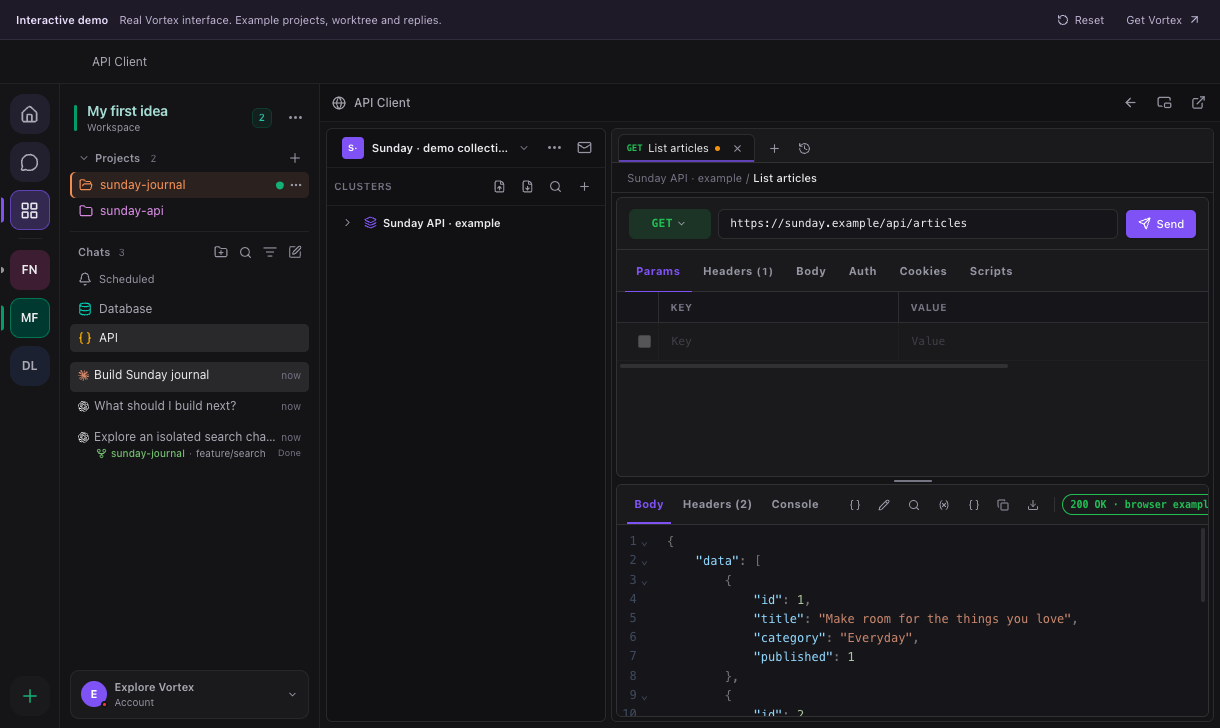
The screenshot uses prepared browser-demo data. Send sits beside the request address; the response appears below the request editor. No live API endpoint is contacted by this demo example.
| Control | Purpose |
|---|---|
| Cluster / folder | Organizes requests and the variables/authentication they inherit. A tab is a working view, not an additional cluster. |
| New request / + | Opens a request draft. Save it to a named location when it should be reusable. |
| Method | GET, POST and the other HTTP methods offered by the editor. Choose the method required by the endpoint. |
| Address | URL with supported {{variables}}. The unresolved-variable indicator explains names without values. |
| Send | Executes the current configuration. POST, PUT, PATCH and DELETE may modify server data. |
| Cancel | Requests cancellation of an active send. It does not roll back work already accepted by the server. |
| Save | Stores the request in the chosen cluster/folder. Unsaved tab changes and the saved request are distinct. |
| Params | Enables/disables query parameter rows and edits their keys and values. |
| Headers | Configures explicit HTTP headers. Disabled rows are excluded. |
| Authorization | Chooses inherited, none, bearer, basic or OAuth2 authorization. |
| Body | Chooses None, form-data, URL-encoded, raw or binary data. Form-data can include file fields; raw supports JSON, XML, text, HTML, JavaScript and GraphQL text. |
| Beautify | Formats supported text; invalid content can produce a validation error. Formatting does not send the request. |
| Search in request | Finds text inside the editor. |
| Scripts / Tests | Edits code associated with request preparation and response checks. See scripts and responses. |
| Cookies | Inspects and changes cookies applicable to the request. Deleting a cookie can change subsequent authentication behavior. |
| History | Reopens a previous request/result for inspection. Confirm the current configuration before sending it again. |
Use Save after a successful read, close its tab and reopen the saved request to verify the URL, method and required headers persisted. See environments and authentication.